# Build a GraphQL Server using Deno(From Scratch) | Deno Advanced
## Introduction
GraphQL is already known for its good parts. GraphQL helps to build super scalable APIs. It reduces coupling between code and data provider. Deno is one of the fastest-growing frameworks/languages to build APIs. However, Deno community still new. So there is a very little framework in the Deno community. Some of them are in a very early stage of development.
In this article, I will explain how you can easily integrate the GraphQL nodejs module with Deno lang. This is a very basic implementation. However, Still, there is a lot of scope for improvements. This is not the end. This is just beginning.
## Prerequisite
- Deno [installed](https://deno.land/#installation) on system
- Basic knowledge of Deno [read more..](https://decipher.dev/deno-by-example/01-hello-world)
- Basic understanding of routing [read more..](https://decipher.dev/deno-by-example/advanced-routing)
- Basic knowledge of GraphQL [read more..](https://deepak-v.medium.com/build-a-scalable-graphql-server-using-typescript-and-apollo-server-4c116ed1425e)
## Steps
### 1. Basic project directory setup
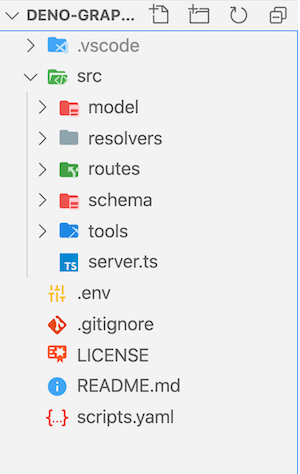
First, create folders and file as described below.
```bash
mkdir src
mkdir src/model src/resolvers src/routes src/schema
touch README.md scripts.yaml src/server.ts
## Optional
mkdir .vscode
touch .vscode/settings.json
```
Here, **src** will be the directory containing all code. **model** is to hold all the _database/models_. We will create all resolvers in **resolvers** directory. Similarly, routes and schema to keep routes and schemas respectively. **src/server.ts** will be an entry for the server to start with.
### 2. Velociraptor as script runner
Deno does not have a task runner like **npm**. However, in Deno community, There are lots of modules we can use. I like [Velociraptor](https://deno.land/x/velociraptor@1.0.0-beta.16). It is easy to start with an easy to integrate.
```bash
## You can check the current version.
deno install -qA -n vr https://deno.land/x/velociraptor@1.0.0-beta.16/cli.tscl
```
Once you install velociraptor using deno, It will be available as executable as **vr**. You can try to validate using `vr --version`. It will print the current version of the velociraptor.
Let's add basic scripts in **src/server.ts**
```yaml
allow:
- net
- read
- env
scripts:
start:
cmd: deno run src/server.ts
test: "echo 'No Test Found'"
build: deno compile --unstable --allow-read --allow-net src/server.ts
```
**Tips:**
**velociraptor** supports JSON, yaml and many more formats. I like yaml version cool so I am using it.
**Explained:**
- **allow** to allow net, read, and env permission to Deno executable
- **scripts** to add command.
Let's add basic **hello world** sever in **server.ts**
### 3. Basic server using [Oak](https://oakserver.github.io/oak/)
We are going to use Oak to build our backend server. It is the most stable and community supported module out there.
```typescript
// src/server.ts
import { Application } from "https://deno.land/x/oak/mod.ts";
import { config } from "https://deno.land/x/dotenv/mod.ts";
import { Logger, LoggerOptions } from "https://deno.land/x/deno_util/logger.ts";
const initialOptions = { level: 0, format: "%s", newLine: true };
const logger = new Logger(initialOptions as LoggerOptions);
const { PORT = 4000 } = config({ safe: true });
const app = new Application();
app.use((cxt) => {
cxt.response.body = "Hello GraphQL";
});
logger.line(`🚀 Server is running on http://localhost:${PORT}/graphql`);
await app.listen({ port: Number(PORT) });
```
**Run:**
```bash
vr start
```
**Output:**
```bash
==========================================================
|| 🚀 Server is running on http://localhost:4000/graphql
==========================================================
```
**Info:**
You may get a pop-up to allow network access to Deno when you try to run the server.
**Explained:**
- Import oak module to create an Application.
- [dotevn](https://deno.land/x/dotenv@v2.0.0) to allow create environmental variable.
- [deno_util](https://deno.land/x/deno_util@v0.0.3) to create a basic logger.
- **app.use** to create basic route. Currently, It will respond **Hello GraphQL** to every request.
### 4. Basic mock database
Since the purpose of this tutorial is not to teach you how to bind database and all. So we will mock the database as close as a real app.
Create a **database.ts** file `touch src/model/database.ts`
```typescript
// src/model/database.ts
const users = [
{
_id: "6027d46771b8a91a27bc9e13",
index: 0,
guid: "b0b80419-58a5-42ac-b488-b7c87a66f9f7",
isActive: true,
balance: "$3,095.41",
picture: "http://placehold.it/32x32",
age: 26,
name: "Hickman Beach",
gender: "male",
email: "hickmanbeach@vidto.com",
phone: "+1 (980) 401-2407",
address: "489 Canda Avenue, Buxton, Tennessee, 252",
about: "lorem..",
registered: "2020-11-16T10:40:17 -08:00",
friends: [
{
id: 0,
name: "Franklin Gentry",
},
],
},
];
export interface Friend {
id: number;
name: string;
}
export interface User {
_id: string;
index: number;
guid: string;
isActive: boolean;
balance: string;
picture: string;
age: number;
name: string;
gender: string;
email: string;
phone: string;
address: string;
about: string;
registered: string;
friends: Friend[];
}
export const getUsers = async (predicate?: (user: User) => boolean) => {
if (typeof predicate === "function") return users.filter(predicate);
return users;
};
```
**Note:** You can get the whole file in [github repo](https://github.com/deepakshrma/deno-graphql-starter).
**Explained:**
A very basic mock database with **getUsers** method, which returns users based on a predicate. If there is no predicate, It will return all users else apply a filter using a predicate.
### 5. Create a /graphql endpoint to handle graphql POST request
GraphQL specs support POST to query server. We will use the same. To create a scalable routing. We will create our route in the routes folder and append it in Oak Application using the callback function.
Create files `touch src/routes/index.ts src/routes/graphql.ts`
Let's create gqlrouter
```typescript
// src/routes/graphql.ts
import { Router } from "https://deno.land/x/oak/mod.ts";
const gqlrouter = new Router();
gqlrouter
.get("/graphql", (context) => {
context.response.body = "Please use Post to Query";
})
.post("/graphql", async (context) => {
const result = context.request.body();
if (result.type === "json") {
const { query, variables = {} } = await result.value;
if (query) {
context.response.body = { query, variables };
} else {
context.response.body = { message: "Invalid Query" };
context.response.status = 400;
}
}
});
export default gqlrouter;
```
Let's update **index.ts** to append routes to Server.
```typescript
// src/routes/index.ts
import {
Application,
Middleware,
Router,
} from "https://deno.land/x/oak/mod.ts";
import { requestTraceMiddleware } from "https://deno.land/x/oak_middlewares/mod.ts";
import gqlrouter from "./graphql.ts";
const baseRoute = new Router();
baseRoute.get("/", (context) => {
context.response.body = `Please use /graphql to query`;
context.response.headers.append("Content-Type", "text/html; charset=UTF-8");
});
export default function init(app: Application) {
app.use(
requestTraceMiddleware({ type: "combined" })
);
app.use(baseRoute.routes());
app.use(gqlrouter.routes());
app.use(gqlrouter.allowedMethods());
}
```
**Explained:**
- **graphql.ts**, We have just created an instance of Oak route. It can accept a get request and a post request at endpoint "/graphql".
- All the GraphQL request contains **query** and **variables** as data payload.
- Currently, return `query and variables` in return response.
- **index.ts** to combine routes and apply some other middleware to Oak Application.
Let's update our **server.ts**
```typescript
//src/server.ts
/// Rest of the code...
import init from "./routes/index.ts";
const app = new Application();
init(app);
/// Rest of the code...
```
**Run:**
`vr run start`
**Query using Postman:**
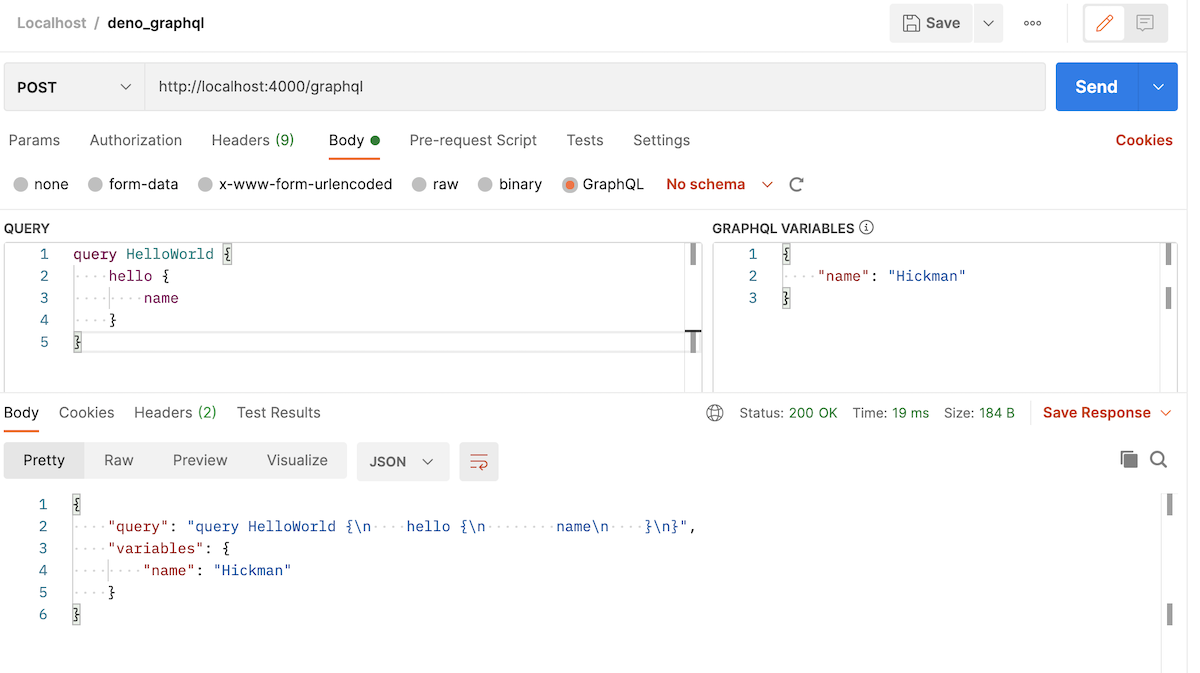
**Query using CURL:**
```bash
curl --location --request POST 'http://localhost:4000/graphql' \
--header 'Content-Type: application/json' \
--data-raw '{"query":"query HelloWorld {\n hello {\n name\n }\n}","variables":{"name":"Hickman"}}'
```
**Output:**
```json
{
"query": "query HelloWorld {\n hello {\n name\n }\n}",
"variables": {
"name": "Hickman"
}
}
```
### 6. Create GraphQL schema and resolver
GraphQL Executor requires schema and resolver to execute the query. For that, we need to create schema and resolver. Schema can be written in String and compile to code using **buildSchema** helper method. Resolvers are basic functions, will be called by graphql executor, and act on the query.
To use GraphQL Executor we have to install/use [graphql module](https://cdn.skypack.dev/graphql) from [cdn.skypack.dev](https://cdn.skypack.dev/graphql)
```typescript
//src/schema/user.ts
const UserSchema = `
type Friends {
id: Int
name: String
}
type User {
_id: String
index: Int
guid: String
isActive: Boolean
balance: String
picture: String
age: Int
name: String
gender: String
email: String
phone: String
address: String
about: String
registered: String
friends: [Friends]
}
`;
export default UserSchema;
```
```typescript
//src/schema/index.ts
import { buildSchema } from "https://cdn.skypack.dev/graphql";
import UserSchema from "./user.ts";
const base = `
type Query {
hello: String
users(name: String): [User]
}
`;
export default buildSchema([base, UserSchema].join("\n"), {});
```
**Explained:**
- You can use [json-to-graphql](https://transform.tools/json-to-graphql), To generate graphql schema
- [buildSchema](https://graphql.org/graphql-js/) compile and validate schema to generate code in runtime.
**Note:** Currently, graphql does not support multi-file schema(Query). So we have to write all queries in **index.ts**. Hopefully, In future, we can use [graphql tools](https://github.com/ardatan/graphql-tools).
Let's create resolvers for **users** and **hello** query
```typescript
// src/resolvers/hello_world.ts
const HelloResolver = {
Query: {
hello: async (_: any, { name }: any = {}, context: any, z: any) => {
return "Hello world!";
},
},
};
export default HelloResolver;
```
```typescript
// src/resolvers/user.ts
import { getUsers } from "../model/database.ts";
const UserResolver = {
Query: {
users: async (d: any = {}, context: any) => {
return getUsers(d.name ? (u: any) => u.name.includes(d.name) : undefined);
},
},
};
export default UserResolver;
```
```typescript
// src/resolvers/index.ts
import HelloResolver from "./hello_world.ts";
import UserResolver from "./user.ts";
const resolvers = Object.assign(
{},
...[HelloResolver, UserResolver].map((x) => x.Query)
);
export default resolvers;
```
**Explained:**
- **user.ts** and **hello.ts** contains an object with Query in it. The query has the function same name as it is defined in GraphQL Schema.
- **index.ts** accumulate all the resolvers.
### 7. Route to handle Query and execute
Now we have created schema and resolver function. We can handle GraphQL requests and responses to the query. For that, we need to update our **src/routes/graphql.ts**.
```typescript
// src/routes/graphql.ts
import { Router } from "https://deno.land/x/oak/mod.ts";
import { graphql } from "https://cdn.skypack.dev/graphql";
import schema from "../schema/index.ts";
import resolvers from "../resolvers/index.ts";
const gqlrouter = new Router();
gqlrouter
.get("/graphql", (context) => {
context.response.body = "Please use Post to Query";
})
.post("/graphql", async (context) => {
const result = context.request.body();
if (result.type === "json") {
const { query, variables = {} } = await result.value;
if (query) {
const data = await (graphql as any)(
schema,
query,
resolvers,
{
request: context.request,
response: context.response,
},
variables || {}
);
if (data.errors) {
context.response.body = data;
context.response.status = 400;
} else {
context.response.body = data;
}
} else {
context.response.body = { message: "Invalid Query" };
context.response.status = 400;
}
}
});
export default gqlrouter;
```
**Query using Postman:**
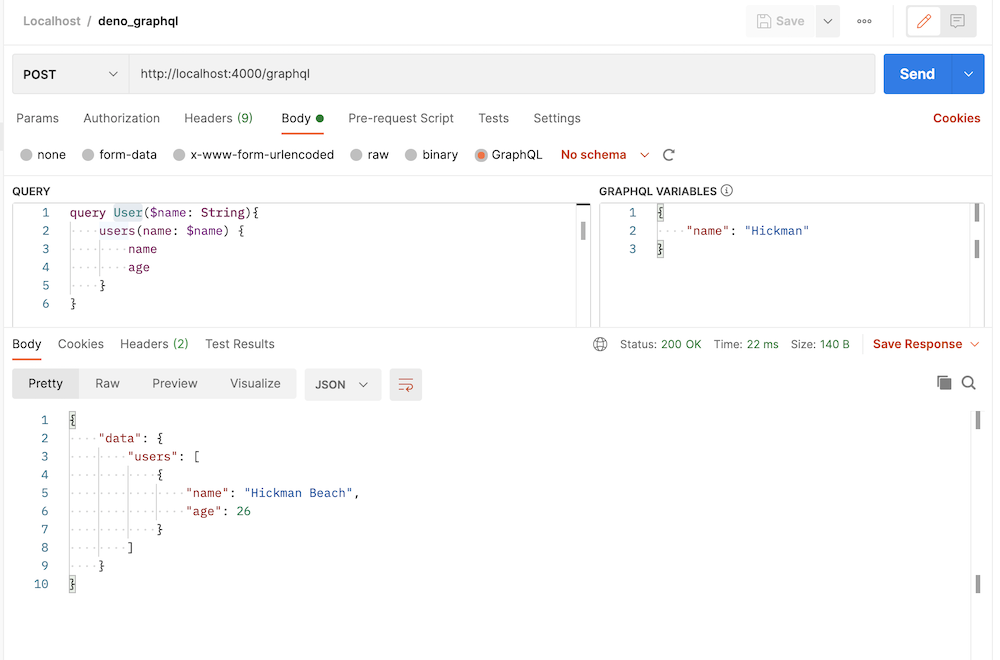
**Query using CURL:**
```bash
curl --location --request POST 'http://localhost:4000/graphql' \
--header 'Content-Type: application/json' \
--data-raw '{"query":"query User($name: String){\n users(name: $name) {\n name\n age\n }\n}","variables":{"name":"Hickman"}}'
```
**Output:**
```json
{
"data": {
"users": [
{
"name": "Hickman Beach",
"age": 26
}
]
}
}
```
Congrats, Your GraphQL Server is ready to serve(🚀) the request.
## Limitations
As I mentioned earlier, Deno is still very new and the community is also very new. The above app has a lot of limitations. However, We shouldn't stop exploring it. Some of the limitations are highlighted below.
- Support for [multiple Query/Aliases](https://graphql.org/learn/queries/#aliases)
- Merge Schema from multiple files
- Conflict in resolvers
- Validations and Proper Error Handling
## Source Code
[deno-graphql-starter](https://github.com/deepakshrma/deno-graphql-starter)
_I hope you like this tutorial. let me know your feedback in the comment. Please support(🙏🙏) by subscribing and clapping on [https://deepak-v.medium.com/](https://deepak-v.medium.com/)._
[Find More...](https://decipher.dev/deno-by-example/advanced-graphql)